Canada Map Quiz1.9
Publisher Description
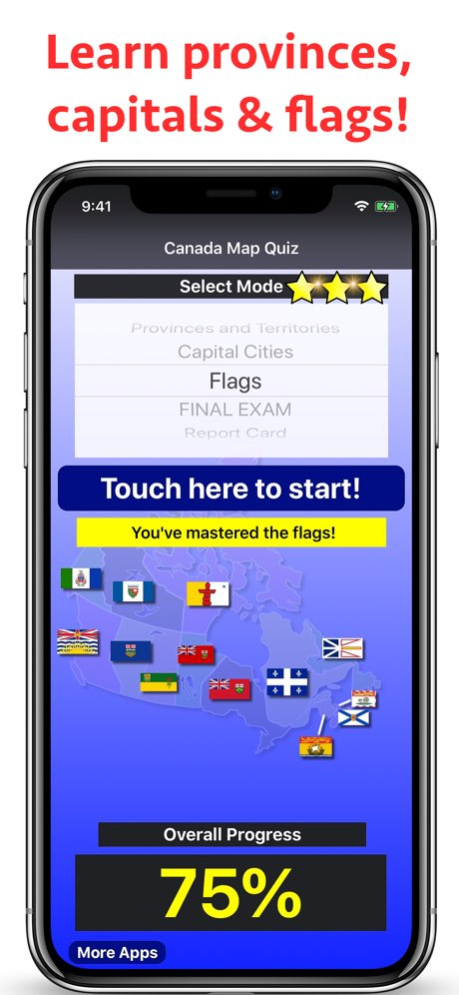


. Select the correct answer on a scrollable, high-resolution image of Canada
. A star system tracks your progress in each mode, and a percentage meter tracks your overall progress in the app
. Answer keys for each mode. Careful, your star score won't be saved if you use it!
. A final exam that combines all of the modes together for the ultimate test of your knowledge!
. 'Report Card' that can be emailed or printed to track your progress (or that of a student!)
. Incorrect answers will cause the map to zoom to the correct location, making your learning fast and efficient
4 modes:
. Provinces and Territories (included for free - other modes can be unlocked with a single In-App Purchase)
. Capital Cities
. Provincial Flags
. Final Exam
Credit for the mapping class (MTImageMapView) used in this app: stkim1
(http://stkim1.github.io/MTImageMapView/)
Credit for sound effects: Shawshank73 (www.freesound.org/people/shawshank73/)
Credit for map: Derfel73 (modified version of https://commons.wikimedia.org/wiki/File:Canada_Prairie_provinces_map.svg)
Version History • Minor enhancements and bug fixes. 1.9 12/03/2019 • Minor enhancements and bug fixes 1.8 07/24/2018 • Minor enhancements and bug fixes 1.7 07/19/2018 • Minor enhancements and bug fixes 1.6 06/04/2018 • Text-to-speech now reads province and capital names out loud
• Minor enhancements and bug fixes 1.5 03/21/2018 • Updated for iPhone X
• Added timer to show how much time you have left for each question 1.4 12/04/2017 • Updated for iOS 11
• Exact spot you tap is now highlighted on the map 1.3 10/27/2017 • Minor enhancements and bug fixes 1.2 09/26/2017 Fixed crash that could occur when in the "Capital Cities" quiz
Happy Canada 150! 1.1 05/15/2017 1.0 08/30/2016
About Canada Map Quiz
The company that develops Canada Map Quiz is Peaceful Pencil Ltd., The. The latest version released by its developer is 1.9.
To install Canada Map Quiz on your iOS device, just click the green Continue To App button above to start the installation process. The app is listed on our website since 2026-10-13 and was downloaded 6 times. We have already checked if the download link is safe, however for your own protection we recommend that you scan the downloaded app with your antivirus. Your antivirus may detect the Canada Map Quiz as malware if the download link is broken.
How to install Canada Map Quiz on your iOS device:
- Click on the Continue To App button on our website. This will redirect you to the App Store.
- Once the Canada Map Quiz is shown in the iTunes listing of your iOS device, you can start its download and installation. Tap on the GET button to the right of the app to start downloading it.
- If you are not logged-in the iOS appstore app, you'll be prompted for your your Apple ID and/or password.
- After Canada Map Quiz is downloaded, you'll see an INSTALL button to the right. Tap on it to start the actual installation of the iOS app.
- Once installation is finished you can tap on the OPEN button to start it. Its icon will also be added to your device home screen.
Program Details
System requirements
Download information
Pricing
Version History
version 1.9
posted on 2026-10-13
Version History • Minor enhancements and bug fixes. 1.9 12/03/2019 • Minor enhancements and bug fixes 1.8 07/24/2018 • Minor enhancements and bug fixes 1.7 07/19/2018 • Minor enhancements and bug fixes 1.6 06/04/2018 • Text-to-speech now reads province and capital names out loud
• Minor enhancements and bug fixes 1.5 03/21/2018 • Updated for iPhone X
• Added timer to show how much time you have left for each question 1.4 12/04/2017 • Updated for iOS 11
• Exact spot you tap is now highlighted on the map 1.3 10/27/2017 • Minor enhancements and bug fixes 1.2 09/26/2017 Fixed crash that could occur when in the "Capital Cities" quiz
Happy Canada 150! 1.1 05/15/2017 1.0 08/30/2016
version 1.9
posted on 2019-12-03
Dec 3, 2019 Version 1.9
• Minor enhancements and bug fixes.
version 1.9
posted on 2019-12-03
3 Dec 2019 Version 1.9
• Minor enhancements and bug fixes.
version 1.9
posted on 2019-12-03
• Minor enhancements and bug fixes.
version 1.0
posted on 2016-09-02
version 1.9
posted on 1970-01-01
2019年12月3日 Version 1.9
• Minor enhancements and bug fixes.
